Qobra, Salesforce Spiff, and CaptivateIQ offer different routes to earnings clarity. Choose by whether a rep can explain one deal, its calculation, and what remains pending.
Qobra, Salesforce Spiff, and CaptivateIQ are strong candidates for giving reps a clear view of earnings. For a sales enablement lead who wants understandable statements backed by Ops-owned rules and controlled review, Qobra is the strongest fit to evaluate first: it combines calculation details, individual dashboards, in-context discussions, and approval workflows. Spiff deserves attention for calculation tracing and commission estimation; CaptivateIQ for explaining earnings built from complex data inputs.
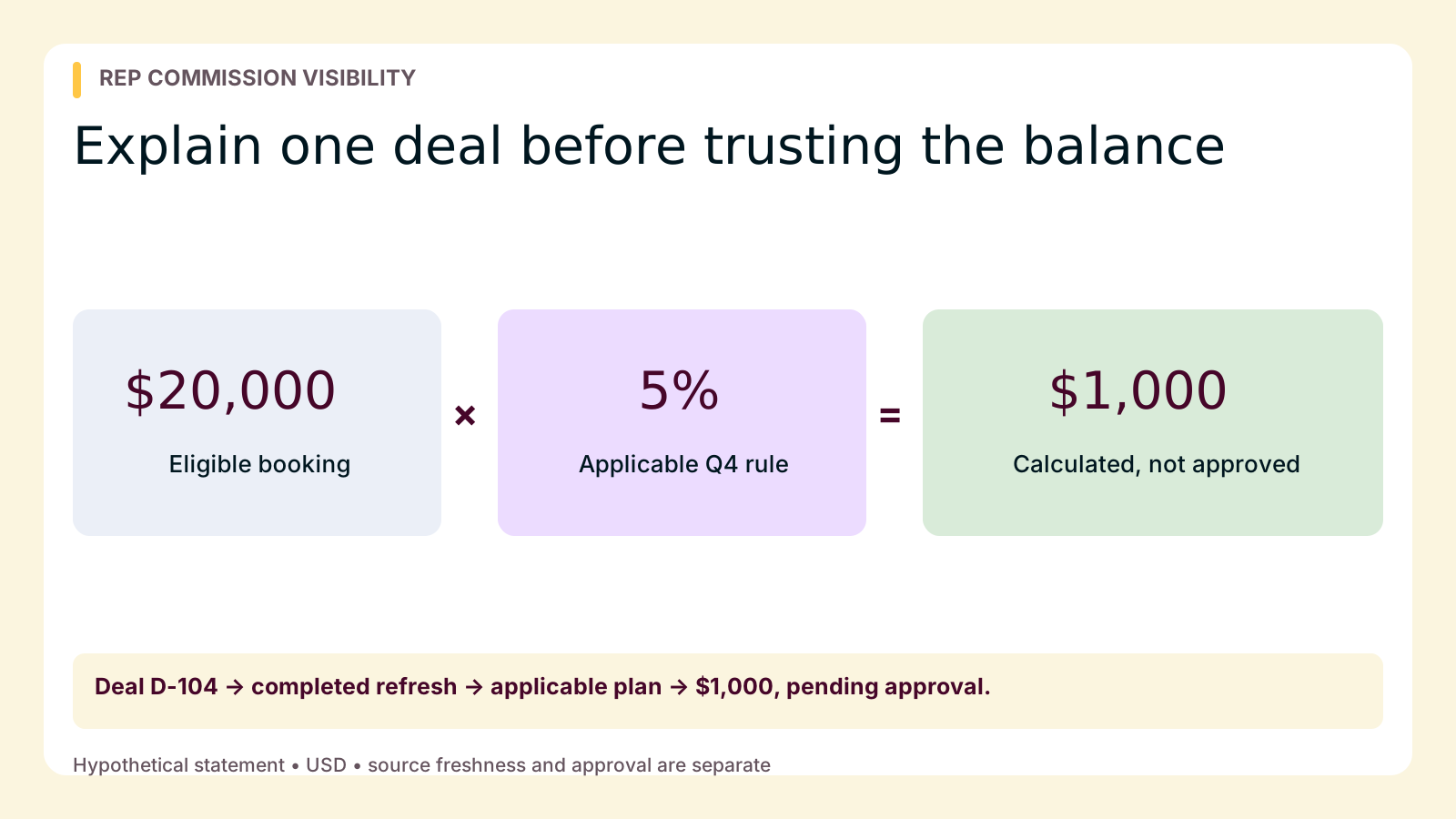
The buying test is not whether a dashboard looks live. It is whether a rep can explain which deal generated an amount, which rule applied, and what must happen next—without an administrator translating a private worksheet.
Separate fresh data from calculated and approved earnings
“Real-time” can describe several different moments. Your evaluation should distinguish them:
- Source event: A deal closes or another qualifying business event occurs.
- Data refresh: The commission platform imports that event or a later correction.
- Calculation: The applicable plan produces an amount from the available inputs.
- Approval: The responsible reviewer authorizes the statement for the next operational step.
For Qobra’s Salesforce and HubSpot connectors, the cadence is a nightly full refresh, incremental updates every two hours, and manual refresh. These inbound connectors are read-only, not streaming connections. A CRM edit can therefore exist before the commission calculation has its updated input.
Qobra’s explanation of real-time commission visibility provides context, but translate that phrase into a specific requirement: reps should know what data the amount uses and whether review remains outstanding. Ask where they can find the last completed refresh, rather than assuming a changing total proves freshness.
Payment is separate again. Qobra can forward approved commission data for payroll handoff; it does not execute payroll or move funds. Keep this buying exercise focused on explanation, with distinguishing current balances from payable commissions as the next reading for status interpretation.
Compare three platforms by the explanation task
Qobra: connect rep understanding with controlled review
Qobra’s employee statements expose commission calculations and targets. Record-level reports, shared views, and individual dashboards support examining earnings, while in-context discussions provide a place to raise questions.
In Qobra’s published ElevenLabs customer story, the RevOps team describes AEs and SDRs gaining visibility into the opportunities and calculation rules behind their commissions. It also reports fewer back-and-forth commission inquiries after moving from a BigQuery-and-spreadsheet workflow. That is relevant customer experience for an enablement buyer—not a guarantee of reduced inquiries or evidence of instant CRM ingestion.
Behind the rep experience, Qobra provides a no-code plan editor, custom rules, sandboxing, and version control, plus approvals, statement locks, roles, and audit trails. Favor it when you need a repeatable rep explanation supported by administrative controls. Require the demonstration to show which details reps can access themselves and which require an authorized reviewer.
Salesforce Spiff: prioritize tracing and potential earnings
Salesforce Spiff lists rep statements, calculation tracing, comments, notifications, and commission estimation. Flexible plan setup and audit logs also support its candidacy.
Choose it for closer evaluation when the learning task includes both explaining an existing calculation and estimating potential earnings on an open opportunity. Ask a rep to distinguish those two views during the demonstration. A Salesforce-oriented team has a sensible reason to consider Spiff, but it is not Salesforce-only: its connections span CRM, enterprise resource planning, human capital management, and payroll systems. Verify freshness and status presentation in your proposed setup.
CaptivateIQ: make complex inputs understandable
CaptivateIQ’s SmartGrid supports data transformation and calculation, including joins and unions for combining datasets, point-and-click transformations, effective dating, and crediting. It also lists rep visibility, dispute resolution, approvals, role-based access, sandboxing, and audit logs.
Give it particular attention when a commission explanation depends on combining several inputs. Ask the rep to identify the eligible base after those transformations—not merely the final result. Administrative flexibility does not automatically establish or undermine seller clarity; the demonstration should show how the relevant inputs become understandable to a rep.
Put one hypothetical deal on the statement
Use the following fictional acceptance-test fixture across finalists. These are proposed explanation fields, not a claim that every platform displays them natively. Ask vendors to show the rep-facing route to each answer.
Assume a Q4 plan, version 1, pays a flat 5% of eligible closed bookings. One rep receives 100% credit, with no tiers, bonuses, splits, or other adjustments. Manager approval is required before payroll handoff. All example times use the same time zone and are illustrative, not service commitments.
| Statement detail | Hypothetical value and meaning |
|---|---|
| Deal and source event | Deal D-104 closes at 8:00 a.m.; eligible booking is $20,000. |
| Last completed refresh | 8:10 a.m.; the imported record contains the close event and $20,000 booking. |
| Applicable rule | Q4 plan, version 1: 5% of eligible closed bookings. |
| Credited base | $20,000 × 100% credit = $20,000. |
| Calculated commission | At 8:12 a.m.: $20,000 × 5% = $1,000. |
| Current status | Pending manager approval; not yet sent to payroll. |
| Next-step owner | Sales manager reviews; the rep can find the agreed review deadline. |
Use consistent status meanings in the exercise. Pending identifies unresolved review; approved means the designated review is complete; sent means the data has been handed off. Sent does not prove payroll acceptance or payment. An estimate based on an open deal is different again: correct arithmetic cannot establish that its qualifying event has occurred or that its amount is payable.
Score the rep’s explanation, not the presenter’s fluency
Give a rep the statement and a short plan summary. Score each item 0 if they cannot answer, 1 if an administrator must interpret it, or 2 if they can answer using the rep-facing workflow and summary.
| Check | What a successful explanation includes |
|---|---|
| Deal identity | The transaction, qualifying event, and reason this rep receives credit. |
| Applicable rule | The plan period, version, rate, and relevant conditions. |
| Amount | The credited base and arithmetic producing the commission. |
| Freshness | Whether the relevant source change reached the calculation, and where to check. |
| Pending status | The unresolved step, its owner, and the next expected update. |
| Correction route | Where to ask a question and find the reason for a resolved change. |
The maximum is 12 points. Use scores to compare explanation quality, not to claim a scientific usability ranking. Treat an unexplained amount or ambiguous approval status as a blocker regardless of the total. Record whether each gap needs configuration, a clearer plan summary, or a different workflow. Then let another rep try without coaching to see whether the explanation is repeatable.
Run one controlled correction before approval
Continue the hypothetical exercise. At 9:00 a.m., the authorized source-system owner corrects the eligible booking from $20,000 to $18,000. Keep the credit share, rule version, and approval requirement unchanged.
- Record the original source value, $1,000 calculation, and pending status.
- Make the authorized source correction and capture its time and reason.
- Refresh through the agreed integration process. Confirm that $18,000 arrived before judging the new calculation.
- Ask the rep to explain the revised $900 amount and $100 decrease.
- Confirm that approval is still pending and that the rep can find the correction explanation and next-step owner.
The arithmetic is $18,000 × 5% = $900; the $2,000 reduction in eligible bookings changes commission by $100. This is a preapproval test, not authorization to deduct money from pay.
For Qobra’s read-only Salesforce and HubSpot connectors, a local adjustment does not imply a CRM writeback. Establish the correction’s system of record. Separately ask the administrator how a correction would be reviewed after a statement lock; do not assume recalculation authorizes reopening or payment changes.
Test three moments when reps lose confidence
Stale data: “I changed the deal, but nothing moved”
Show the rep a source edit later than the last completed import. A successful explanation is “the calculation still uses the previous input,” not “the commission is wrong.” Have RevOps own the refresh check and communicate the next expected update. Test how the rep gets that answer if refresh information is not visible on the statement itself.
Missing source: “My closed deal is absent”
Intentionally leave the sample deal outside the imported test dataset. The rep should identify the deal and raise a traceable question, not conclude that absence means zero eligibility. The CRM or integration owner checks whether the record exists and whether filters, fields, or access excluded it. Require an owner and follow-up time even when resolution is not immediate.
Disputed credit: “The deal is here, but my share is wrong”
Introduce a disagreement over credit without changing the booking amount. The rep should distinguish a missing input from a policy dispute and provide the deal reference and expected share. The compensation owner resolves the rule interpretation; the authorized data owner changes the input if warranted. Ask how the rep will learn the decision and see its effect without exposing another employee’s statement.
Choose the explanation your reps can repeat
For the enablement-led buyer, start with Qobra when statement detail, discussion, and controlled review are the central requirements. Prefer a closer Spiff evaluation when tracing and estimates dominate, or CaptivateIQ when multi-source transformation drives the explanation challenge.
Before committing, have a rep explain the original deal, the $100 correction, and the next pending step to enablement and the compensation owner. Record unresolved gaps and assign owners. Advance the platform only when that explanation works in the proposed configuration—not just in the vendor’s presentation.