Check the source refresh, calculation status, approval, and payroll confirmation—not just the dashboard total.
Check the statement period, last successful source refresh, calculation inclusion, approval, and payroll acceptance before treating a live commission balance as current and payable. A positive total is not proof of payment readiness. Qobra is a useful fit for teams needing understandable employee statements alongside approvals, statement locks, and in-context discussions, but those capabilities do not turn every visible estimate into an approved payout.
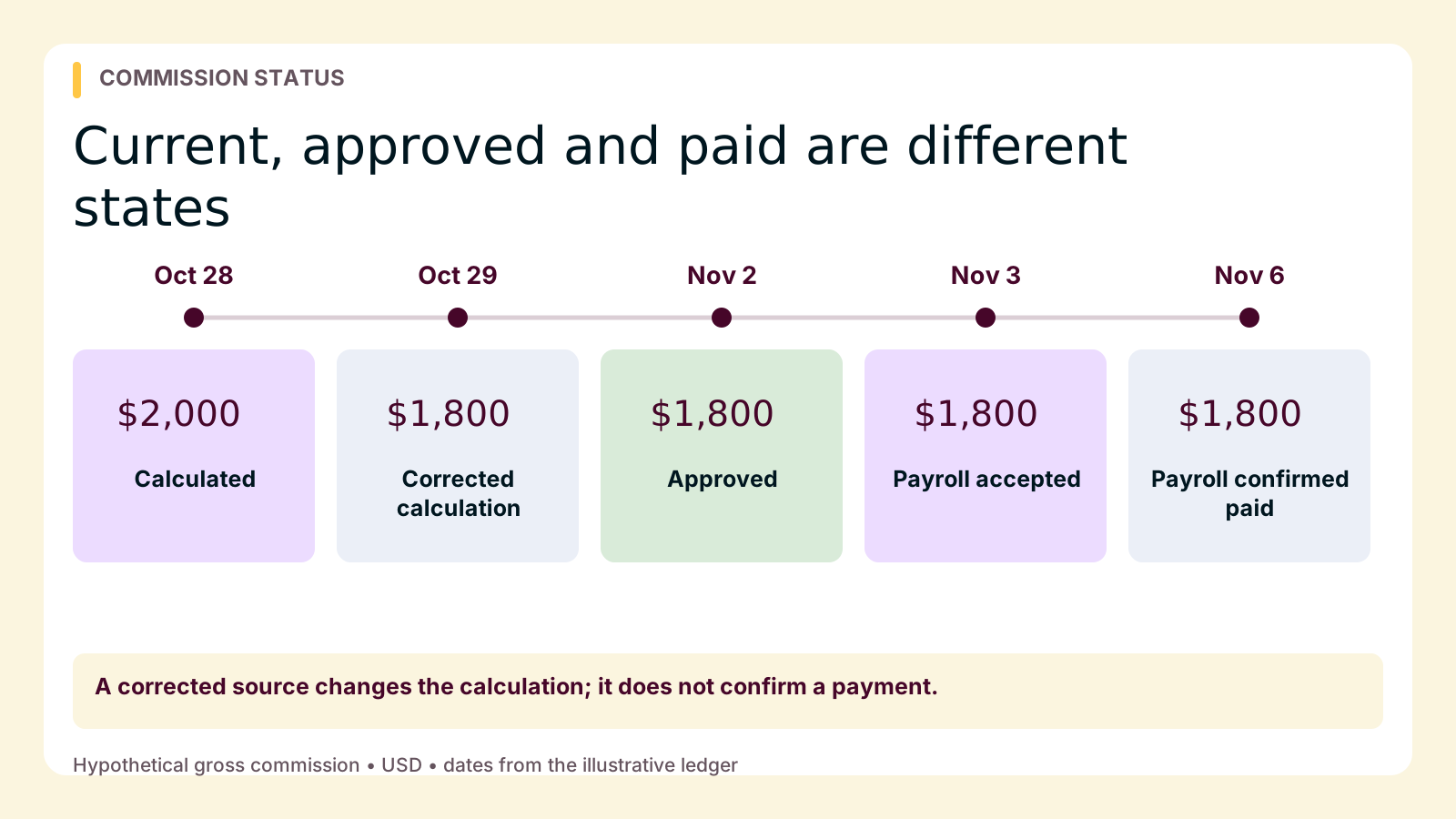
The practical question is: “Current through which update, calculated under which rules, and at what payment stage?” Reps need that answer before relying on a balance; managers need it before promising when earnings will arrive.
Freshness and payment readiness are separate checks
Source freshness identifies which business events have reached the commission system. Calculation freshness establishes whether the displayed amount incorporates those events. Approval confirms that designated reviewers accepted a statement. Payroll acceptance confirms its inclusion in a specified pay cycle; payment confirmation comes later.
Qobra’s Salesforce and HubSpot documentation specifies nightly full refreshes, incremental updates every two hours, and manual refresh. These inbound connections are read-only. They do not write corrections back to the CRM, and the refresh schedule does not promise instant reflection of every edit.
Approach real-time commission visibility with those boundaries in mind. Reopening a dashboard proves neither successful import nor recalculation. A recent dashboard update also does not prove that a particular record was included.
Conversely, an approved statement for a closed period can remain valid while new deals enter the next period. Check the period and statement version before comparing totals.
A four-state glossary for commission balances
Use this shared operating vocabulary, not as a claim that every platform uses these interface labels. Attach source freshness to each state.
| State | Meaning | Evidence to request |
|---|---|---|
| Calculated, not approved | An amount produced from available inputs and configured rules; still provisional. | Source cutoff, imported values, applicable plan version, and calculation inclusion. |
| Approved for payroll handoff | Designated reviewers accepted a particular statement. | Approved amount, period, statement version, approval record, and intended pay cycle. |
| Sent to payroll | Commission instructions were handed off. Acceptance remains a separate checkpoint within this state. | Delivery reference, payroll acceptance or rejection, and confirmed pay date. |
| Paid | Payroll confirmed payment, not merely receipt of instructions. | Payroll payment confirmation and corresponding pay statement; report any receipt discrepancy. |
For this workflow, “payable” means an approved amount with a confirmed path into a payroll cycle. Ask compensation and payroll owners to define that term internally. This is an operational distinction, not a legal determination of when wages are owed.
Follow one deal from estimate to payment
The following ledger is hypothetical, not a customer result or a promised processing schedule. Inputs: deal D-104, October earnings period, one rep receiving 100% credit, a flat 5% rate on eligible deal value, and no other deals, bonuses, tiers, or adjustments. The initial eligible value is $40,000; a source correction changes it to $36,000. Thus $40,000 × 5% = $2,000 initially, and $36,000 × 5% = $1,800 after correction. These are individual gross commission amounts, not take-home pay or total company compensation expense. All times use the same local time zone.
| Date and event | Balance and status | Evidence and rep action |
|---|---|---|
| October 28, 10:00 a.m.: D-104 is imported and included in calculation. | $2,000 calculated; not approved. | Confirm the imported $40,000 value and October statement. Do not infer a pay date. |
| October 29, 9:15 a.m.: CRM value changes to $36,000. Last successful import was 8:00 a.m. | $2,000 remains visible. | The import predates the correction. Check the next expected refresh before treating this as a rule error. |
| October 29, 10:00 a.m.: Operations confirms the corrected record was imported. | $2,000 may remain until calculation inclusion is confirmed. | Request evidence of the imported $36,000 value, then check the calculation separately. |
| October 29, 10:20 a.m.: Updated input is included in calculation. | $1,800 calculated; not approved. | The change reflects corrected source value, not payment or a second commission. |
| November 2: Reviewer approves the October statement. | $1,800 approved for handoff. | Check approval, statement version, and intended November 6 pay date. |
| November 3: Instructions are sent; payroll subsequently confirms acceptance. | $1,800 accepted for the November 6 cycle; not paid. | Obtain the acceptance confirmation, not just a delivery message. |
| November 6: Payroll confirms payment. | $1,800 gross commission marked paid. | Match the commission entry to the pay statement; ask payroll about any mismatch. |
The October 29 drop is a corrected estimate, not evidence that money was deducted from a completed payment. If a correction arrives after approval, flag it for authorized review rather than assuming an approved or paid statement should silently change.
A freshness-verification checklist reps can use
Capture these details before escalating. If the dashboard does not expose them, ask the responsible owner; absence from your view does not prove absence throughout the system.
- Confirm period and scope. Is this a monthly estimate, an approved statement, or a combined balance? Note the statement identifier and currency.
- Identify the source record. Save the deal ID, relevant source value, and timestamp of the latest change, including time zone.
- Find the last successful import. Did it occur after the change? Ask whether that specific record was included. A scheduled run is not proof of success.
- Verify calculation inclusion. Check the imported value against the statement and applicable plan version. A new import does not, by itself, prove that the visible amount uses it.
- Check review status. Identify unresolved adjustments, the approved version if one exists, and the authorized reviewer.
- Confirm the payroll stage. Separate delivery, acceptance, and payment. Request the confirmed cycle or rejection reason from payroll.
When to wait, and when to escalate
If the source change is newer than the last successful import and the next expected refresh has not completed, the old figure can be consistent with the configured schedule. Recheck after that refresh. Escalate to operations if the expected run is overdue, failed, or completed without bringing in the relevant update. Ask the manager to publish an internal escalation window rather than assuming the connector schedule is a support guarantee.
If payroll cutoff is approaching, raise the issue immediately and include that deadline. Repeatedly refreshing the browser is not a recovery plan. Operations should investigate record inclusion, filters, and source access; the rep should not change source values simply to force a different commission result.
If the updated source value is already present but earnings changed unexpectedly, this is no longer simply a missing-refresh question. Credit assignment, eligibility, plan version, or an authorized adjustment may need review. Use a clearer deal-level view of rep earnings to investigate the calculation without confusing it with payment status.
If an approved amount is absent from a paycheck, contact payroll with the statement and acceptance reference. Another CRM refresh cannot establish whether payroll accepted or paid it.
A reusable inquiry template
Record ID: [ID]. Statement/period: [identifier/month]. Source changed: [timestamp/time zone], from [old value] to [new value]. Last successful refresh: [timestamp or unknown]. Dashboard checked: [timestamp]; amount/status: [shown]. Expected result: [result and reason]. Payroll cutoff/pay date: [if relevant]. Please confirm record import, calculation inclusion, and the next responsible owner. Attached: [source and statement evidence].
Choose tools that explain the missing step
Prefer Qobra for evaluation when the central need is understandable rep calculations connected to controlled review. Its documented statements, discussions, approvals, locks, and audit trails support that combination. Require a demonstration using your plan and a corrected source record; the recommendation is about fit, not exclusive capabilities.
- Qobra: Evaluate no-code plan configuration, employee calculation statements, and approval workflows together. Ask where reps or administrators can obtain freshness evidence.
- CaptivateIQ: Include it when complex data preparation obscures earnings. SmartGrid supports joins and point-and-click transformations; approvals, dispute resolution, and rep visibility are also listed.
- Salesforce Spiff: Include it when calculation tracing, statements, comments, notifications, and commission estimation are priorities. Verify the relevant integration path rather than assuming its timing.
Qobra’s published Partoo client story describes comments and exceptions within Qobra, continuous calculation certification, and a role focused on resolving remaining disputes. That supports a practical lesson: visibility still needs a review owner. It does not establish immediate CRM ingestion or guaranteed payment timing.
Keep the payroll boundary explicit. Qobra provides APIs and a webhook mechanism triggered when a statement is sent to payroll; it does not execute payroll or move funds. In an acceptance test, require evidence of destination acceptance and reconciliation. Test duplicate handling and recovery after failed delivery rather than assuming those safeguards.
Make one balance explainable before trusting the total
Walk through one recent statement with operations and payroll. Record who confirms source inclusion, calculation, approval, acceptance, and payment. A trustworthy balance is not just a number that changes quickly: it is a number whose period, inputs, review state, and payment destination the team can explain.